
Export your song
Export to WAV or MP3
When your song is ready, the Export menu produces a single audio file from the full mix of the session. This menu only appears when a session is open.
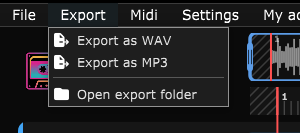
- Export as WAV: lossless file, higher quality, larger.
- Export as MP3: compressed file (192 kbps), lighter, good for sharing.
The exported mix is exactly what you hear on playback: each track's volume, the effects, the equaliser and the overall volume are taken into account, and muted tracks are left out.
A progress window shows the session name, the format and the file size during the render.
When the block editor is open, this menu changes target: it then exports the block being edited rather than the session (see Editing the waveform › Export the block).
Get the file
When the export finishes, the application opens the file explorer with the produced file already selected.
The Export › Open the export folder menu reopens that folder at any time. Every export creates a new, numbered file, previous exports are never overwritten.
ASIO is a trademark of Steinberg Media Technologies GmbH, registered in Europe and other countries.